I’ve added some new features to Atari FontMaker, so if you’re still using the old one, it’s definitely worth grabbing the update!
Here’s the list of changes for the latest version:
What’s New:
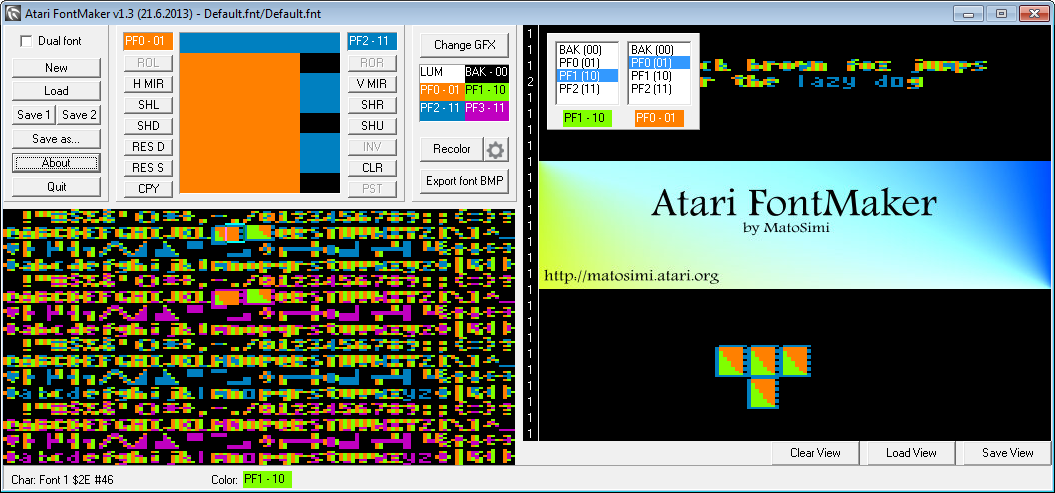
- Wider Layout: Recommended screen resolution is now 1024px or higher, otherwise the window won’t fit.
- Massive View Window: Expanded from 8 lines to 26 and moved to the right side of the app.
- BMP Export: You can now export fonts as BMP files for use in tile editors.
- Recolor Tool: Easily “swap” colors within the character you’re currently editing.
- Selection Box: A frame now clearly marks which character is being edited.
- Mousewheel Support: Quickly cycle through characters using your mouse wheel.
- Color Labels: Added descriptive labels for the color palettes.
- Status Bar: Now shows the current character number and selected color.
- “Toggle Draw” in View Window: No more clicking for every single cell—just click, hold, and drag to paint characters into the view window.
- Precision Control: Holding CTRL temporarily disables the drag-draw feature, returning to the “one click = one character” behavior (works in both the editor and view windows).
- Fully Compatible: Still opens view files created in older versions of FontMaker.
Download:
Please download Atari FontMaker from its main page.
Thank you very much for this new version of FontMaker, is an excellent software to work with character design for our Atari.
I hope you continue to improve the program, will soon be a 100% replacement EnvisionPC.
Greetings from Chile.
Servus, paráda … vďaka, Igor.
Pecka diky moc!